Archive for the “New Features” category
Timeview PRO and themes
February 2nd 2013, 10:30 pm
So, it’s been a little while since we’ve had a proper blog post, hopefully you’ve noticed some of the minor updates over the past nine months. Earlier today we released a few key features and updates.
Timeview for PRO
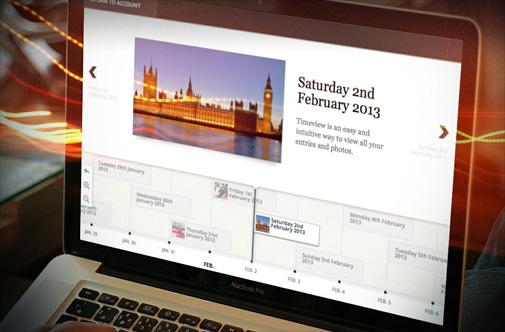
PRO users now have an exciting new interface for navigating through their entries. It’s a really easy and intuitive way to look back through your entries and is especially good if you have lots of photo uploads. To preview it in action you need a minimum of three entries, you can find in by navigating to View Entries -> Timeview (PRO).
New look and themes
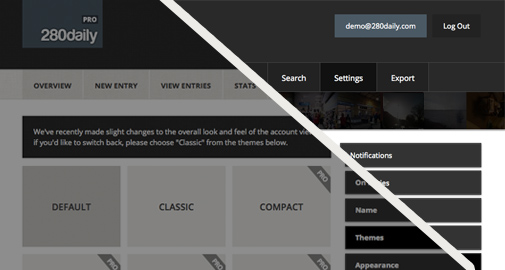
You may have noticed the look and feel of 280daily has been subtly enhanced. If you’re not a fan of the new look, you can switch back by navigating to Settings -> Themes and selecting “Classic”. There you’ll also find a number of PRO themes, that provide greater contrast and additional design features.
Recent login activity
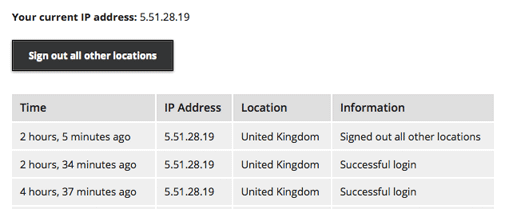
Along with all that, you can now view the recent login activity of your account. This gives you the ability to sign out of all other locations for peace of mind. Useful if you’ve logged in at a public location and forgot to sign out. To access your activity log, scroll all the way down and bottom right of the footer you’ll find a link to your “Recent login activity”. The data is available for 2 days for non-PRO users and 30 days for PRO. Failed login attempts are also recorded on PRO accounts.
PDF export improvements
February 28th 2012, 11:29 pm
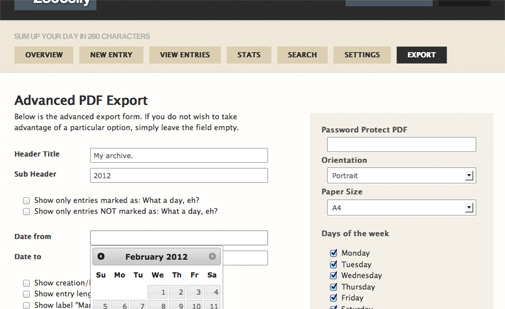
Earlier today we rolled out some significant improvements to 280daily’s export to PDF functionality. An overview of the main updates can be seen below:
- Improved PDF layout
- Better support for foreign characters
- The ability to password protect your PDF
- Vastly reduced PDF file size
Please let us know if you spot anything unusual or if you have any ideas!
Export to book now available
January 8th 2012, 3:14 pm
After a few delays the export to book functionality is now ready and available to anyone with over 30 entries. It’s been kept extremely simple. You have a choice of background, title, subtitle, inclusion of uploaded photos and the ability to select only the entries you’d like included in the book.
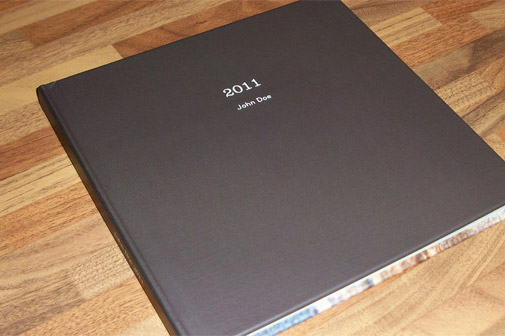
Due to the quality of the books, along with the costs of running the site, delivery and labour costs, we couldn’t get the price as low as we’d of liked. However the books are of an extremely high quality and the price isn’t dependent on the number of entries. Therefore, for the best value, we recommend over 50 entries, but the minimum is set at 30 entries.
If you have any questions at all about exporting to book, please contact us.
Did you know?…
June 9th 2011, 12:19 pm
… 280daily has thousands and thousands of users who have written millions and millions of characters… no really, it’s true! It’s all the more surprising when you consider it’s a completely unsociable platform far removed from the vast social sea of liking, tweeting, stumbling and poking. We must be doing something right if you like it enough to share it with friends over afternoon tea.
With all that said, we’ve now introduced an incentive for referring friends to 280daily. A small incentive, but an incentive nonetheless. You might have noticed you now have an extra monthly quota. Well now you can earn an extra 250 characters per month for each person who signs up using your referral link. You can find your referral link in your account overview. Let us know what you think and if you have any suggestions.
Additional character quota and grid layout
May 11th 2011, 12:34 am
Many of you have requested the ability to add additional characters on those days when too much happens and you don’t have enough space. We’ve added an additional quota of 500 characters per month, which will be reset at the beginning of each month. Before you begin writing your entry, in the knowledge you’ve had an eventful day, you can add as many additional characters as you have available.
The grid layout feature is still in early stages, but is available to try. If you have any suggestions, please let us know.
New features and a small pledge
March 20th 2011, 11:39 pm
Everyday we receive an overwhelming amount of complimentary feedback, it’s always greatly appreciated. Yesterday a user sent in some unexpected thoughts on recent events in Christchurch,
“Recently, Christchurch had a large earthquake while I was there, and 280daily helped me see the stark difference in my posts between the day before and after the quake. Before, I was complaining about little things like not enough hot water, but now afterwards I can see how ridiculous this was compared to the devastation and loss surrounding me. Looking back at my posts, this helped me get some perspective, and for that, thank you.”
The Christchurch earthquake last month was New Zealand’s deadliest natural disaster in 80 years. Little more than a week ago an 8.9-magnitude earthquake hit Japan causing a national disaster. It’s a small pledge, but for the next month, any profit we make on 280daily mugs will go towards the Japan Tsunami Appeal.
More stats
Just a quick note regarding new features. In your account statistics, you now have the option to view your most frequently used words, we’ll be expanding functionality here also. Let us know what stats are important to you.
Including a link
Another feature requested by users has been the ability to include a web link along with an entry. You can enable this by visiting Settings -> New Entry. There you’ll find the option to display a field for an interesting web address you’ve found that day.
Features, criticism and general comments are always welcome.
3 improvements plus CSV support
March 6th 2011, 12:10 pm
New Recommendation Options
We’ve provided two new recommendation options. You can now email up to 100 people at a time using email recommendation. Or we can post you 280daily handouts free of charge. You can recommend by clicking the “Recommend friends” button on your account overview.
Advanced Date Selection
We were never happy with how we implemented advanced date selection for both selecting a new entry and viewing previous entries. If you now visit advanced date selection (at the bottom of those pages), you will now be able to navigate quickly in a smooth linear fashion.
Export to Spreadsheet
We’ve added the option to export to CSV, this allows you to export all your entries and open the file with spreadsheet software such as Excel and Numbers.
Larger New Entry Space
We’ve cleaned up the New Entry page, so that you can focus on writing your entry. As always, if you have any feedback, please let us know.
9 new features, a bunch of tweaks… and a mug
January 28th 2011, 3:30 pm
Since our update last week regarding the introduction of photo support, we’ve introduced 9 new features (depending on what you determine a feature) plus a bunch of tweaks!
Graphical Statistics
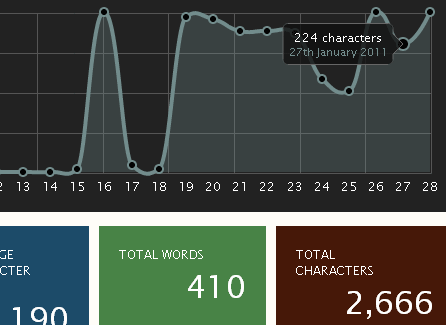
We’ve begun the introduction of graphical statistics which you can access by clicking your email address in the top right hand corner. Currently the graph shows your character length over the past 30 days, helping you spot days when you’ve forgotten to write an entry or days in which you’ve had less to talk about. Let us know if there’s a set of statistics you’d like to see. We’d like to make it possible to find trends, which would allow you to formulate conclusions. What makes a great day?
New Photo Features
In terms of photo support, we’ve been playing around with it trying to get it just right. We’re not quite there yet, let us know what you think. Other than the ability to view your image when viewing your entry, there is an updated standard flick through gallery, a new thumbnail gallery and a new full screen gallery. Along with this, we’ve introduced the ability to download your original picture file. Our photo uploader has also been improved to show the progress of your upload.
Date based relation
Essentially this allows you to link to other entries through referencing a point in the future or past. For example, if you type ‘yesterday’ in your entry, when you view the entry, the word yesterday will become a link to the day before. This would similarly work with ‘this time next week’ plus other references.
Advanced PDF
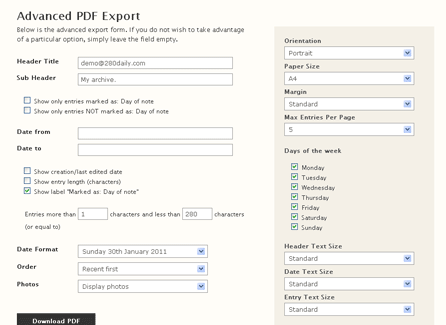
One of the features we were desperate to build was advanced PDF functionality, this feature is still in progress, but it’s a vast improvement on previous functionality. You can now export entries based on an array of variables into an array of shapes and sizes. Paper sizes now include Letter, A4, A3 and A5 as well as the ability to determine orientation and margin size. A significant enhancement is the ability to include your photos in your export. Again, we’re still working on improving PDF export, so please let us know what you think.
Other updates
You might notice changes in date formats, settings, search and account overview. The rate of new users has exceeded all expectations and we have a feature to-do list longer than a very long flat fish. Keep your eyes peeled for updates and thank you for using 280daily.
Tea? Coffee?
280daily is a free service, but we do have hosting and development costs. You now have the ability to purchase a 280daily mug, great if you enjoy a hot drink when writing your entries. We’ve made the process of purchasing a mug as simple as possible. Costs may be high in your continent or country due to shipping, we’re sorry about this!
Modelled beautifully by our bearded dragon lizard. The mug is designed to be amusing and is in no way meant to be offensive. The slogan is a spoof of a marketing campaign by a leading sports-wear company. It’s the ideal writing companion!

Photo support… plus a look at your feedback
January 19th 2011, 1:58 pm
Yesterday we rolled out photo support for 280daily. Along with your (up to) 280 character entry, you can now upload a photo. By default the picture will display under your entry when you view it. This can be changed in your settings under “Appearance”, along with the ability to completely disable photo support (you can re-enable at any time).
If you have uploaded photos, you will have access to your gallery (Daily Photo). Photo support is in its infancy and we’ll be working to improve it (while keeping it simple).

Along with photo support we’ve added a new account overview box, “Random Photo”, this isn’t enabled by default. When enabled, it will display a random photo that you’ve uploaded, clicking on the photo will redirect you to that particular entry.
I also wanted to talk a little about the feedback we’ve received and the features we’re working on. The beauty of 280daily is in its simplicity, so there’s a delicate balance between features and simplicity, which is why it’s important that users configure 280daily exactly how they would like it.
Arun sent us this feature request,
“It would be great if I could get the “Account Overview” as a side bar on the right hand side of the screen.”
This seemed like a reasonable request, you can enable this by visiting your “Appearance” setting and locating the “Sidebar Box” header.
John sent us this feedback,
“It would be very useful to be able define a date range when exporting 280s. I could see this being useful for team members at work when they want to review what their tasks have been for say, the last two weeks. The sheet could be printed out and brought to a meeting.”
We’ll be working on advanced exporting options for exporting to PDF and printing. Plus we’ll be introducing one of our most exciting features in the next few months, the ability to export your entries to a physical book.
We’ve received feature requests and compliments, but some of you like to share your experiences with us,
“I remembered my trip to Japan for a study abroad program at my university. I always wished I’d blogged more, or took more pictures, or SOMETHING to document everything. But I didn’t because just taking a picture and downloading it, figuring out the essay-format post for a blog… those seemed so tedious. 280 characters would’ve worked beautifully for a simple travel log, something to remember that trip by.”
It’s great for us to hear your experiences! It’s also great to hear that a lot of you are using 280daily to improve how you spend your days. But I’m not dictating how you should live your life! However, if you can achieve one thing a day that you’re proud of, then what a life you must be living! This would be great, but it is of course unrealistic for most of us, which is why we have the “Day of note” feature!
“I use quite a few web services, but your interface is one of the cleanest, best structured and organized interfaces! Thanks and keep up the good work!” – Mirco
“Great concept & a beautifully designed site.” – John
“I thought of starting a diary this year, but I’m too lazy to write pages and pages so dropped the idea. But after I saw details of your site on TNW, I felt this was exactly the service I was looking for (should be online, secure, short, neat and have a clean interface). Excellent work guys.”
Finally, some of our non-english members are requesting translated versions of 280daily. This is something we’d like to do when 280daily has planted itself firmly. While we’re currently introducing features and growing, it’s difficult to maintain translations.
Thanks again for all your feedback, we will get around to responding to every feedback request individually, but it might be a while before you hear from us.